Saturday, 28 May 2016

Saturday, 21 May 2016


Saturday, 30 April 2016
Storyboard
The following is my storyboard that I plan to convert into Scratch. It is focused on the topic, cyber bullying and how to stop it.


My storyboard focused on the topic of cyberbullying, a form of bullying that happens on online from people that are either anonymous or someone you know, as this is a growing issue for people around the world as more and more people use social media, I thought that it would be a good topic for my storyline to focus on. It's about a girl called Matilda, who was cyber bullied for many years until she got the courage to talk to someone and end the torment she had been facing. My story also features ways to solve the growing issue.
I enjoyed designing the storyboard, such as figuring out how my characters would look like, their colors, their personality, etc. It was also nice to pick out the speech that they would say and design my character in their speech and how their attitude towards the other would be like. The girls who cyber-bullied Matilda were obviously shown as snotty, cruel people whereas Matilda's friend, Clarissa, the one she talks to encourages her to speak out and stop them. Another thing I enjoyed was the range of backgrounds I could pick from, I could have just stuck with the same background of Matilda talking to Sarah in one room but decided to demonstrate a possible technique I could use whilst using Scratch to create my story, which is the change of backgrounds.


Reflection
1. What did I do?
My storyboard focused on the topic of cyberbullying, a form of bullying that happens on online from people that are either anonymous or someone you know, as this is a growing issue for people around the world as more and more people use social media, I thought that it would be a good topic for my storyline to focus on. It's about a girl called Matilda, who was cyber bullied for many years until she got the courage to talk to someone and end the torment she had been facing. My story also features ways to solve the growing issue.
2. What did I enjoy?
I enjoyed designing the storyboard, such as figuring out how my characters would look like, their colors, their personality, etc. It was also nice to pick out the speech that they would say and design my character in their speech and how their attitude towards the other would be like. The girls who cyber-bullied Matilda were obviously shown as snotty, cruel people whereas Matilda's friend, Clarissa, the one she talks to encourages her to speak out and stop them. Another thing I enjoyed was the range of backgrounds I could pick from, I could have just stuck with the same background of Matilda talking to Sarah in one room but decided to demonstrate a possible technique I could use whilst using Scratch to create my story, which is the change of backgrounds.
3. What did I find difficult?
It was difficult to find the topic I wanted to do as I had first wanted to use my passion in creative writing and demonstrate it through IT and scratch but I thought better of it because I did not think of a good enough idea that could be portrayed in Scratch, as well as that I suffered from writer's block as I could not think of a decent idea. However after taking inspiration from the various scratch projects miss had shown us of international issues, I decided to do cyber-bullying. As well as that, this school is an international school so I thought it would be better fitting to do cyber bullying.
4. What worked well?
The background story of Matilda, the victim of cyber bullying in my story, I think worked well as it let you in deeper of how a person reacts to cyber bullying. As most websites talk about the facts of it and how it happens, etc. However, I decided to branch out and try and look through a victim's mind and see how they would react to it and how they would get the confidence to fight back.
5. What would I do differently?
If I could repeat my storyboard, I would add in more movements and more sign of action. As they are mostly either sitting or standing, I am going to add more motion scripts when I convert this into a Scratch project, other than the lack of action happening throughout the story, I am quite proud of how my plan of my story turned out.
Tuesday, 26 April 2016
Saturday, 23 April 2016
Tuesday, 19 April 2016
Scratch Project - The Ocean
The following is the scratch project I created, that follows the instructions of the task to be able to move the mouse cursor so it labels ever object that I have put the coding in. My project is about the ocean.
Wednesday, 13 April 2016
Art Theme
The following is the scratch project I created using shapes and motions, along with it are the sprites and scripts I used to create the motions.


Tuesday, 29 March 2016
Building a Computer
Parts of a Computer
The following is a table with the name, meaning and image of each part of a computer.

Saturday, 19 March 2016
UAE National Agenda
Today we learnt about the National Agenda, it has 6 pillars, the one I was assigned to work on was World Class Health Care. The following is my PowerPoint slides that I worked on with Marcela.


Tuesday, 1 March 2016
Peer Evaluation of Tech Fair
Peer Evaluation of Tech Fair
Students in the Group: Aya Altounji, Jana Tartir, Sireen Banayan
Name of Project - Motion Sensor Robot
Date: 28/2/2016
1. What was the project about?
The project was about a robot that can detect motion. For example, if you walk in front of it, the robot can detect movement and moves to stop you. This could be useful in if you wanted to guard something like keeping your siblings out of your room or keep something safe.2. What are the positive things you liked about their presentation?
The things that I liked about the robot was that it had something unique to it and had a real purpose that could be used in everyday life.3. Is there anything specific you would like to give them as feedback for improvement?
The robot was a bit late in moving towards the motion so it would be better if the response of the robot was much quicker, also, they could have added things like an alarm or a camera onto the robot so that you would know if someone was intruding.
4. According to you, do you think their project needs to be a part of the Tech Fair 2016?
----
Students in the Group - Evrard & Riccardo
Name of Project - Green Screen
1. What was the project about?
Their project was creating a green screen, they created a whole story line and script, then acted it out with different backgrounds aka a green screen.
2. What are the positive things you liked about their presentation?
I liked the idea of it and how it was unique and wasn't a robot like many others had created.
3. Is there anything specific you would like to give them as feedback for improvement?
Perhaps, experiment more with the green screen and use a background that not many would think of.
4. According to you, do you think their project needs to be a part of the Tech Fair 2016?
Yes, it is a very different idea and quite cool.
---
Date: 2nd March 2016
Students in the Group: Krish
Name of Project: Online Game
1. What was the project about?
The project was an online game, inspired by Capture the Flag.
2. What are the positive things you liked about their presentation?
The idea of it, it was something that nobody had done in my class so far, so it was nice to see something that differed from a robot.
3. Is there anything specific you would like to give them as feedback for improvement?
To give more of a preview to it, instead of a ten-second clip.
4. According to you, do you think their project needs to be a part of the Tech Fair 2016?
Yes.
---
---
Students in the Group: Bassel & Sam
Name of Project: RC Car
1. What was the project about?
The project was a car they built that could go extremely fast with a remote control.
2. What are the positive things you liked about their presentation?
I liked the obvious work that was put into it and the knowledge that they had on how they built it and how they explained what each thing did.
3. Is there anything specific you would like to give them as feedback for improvement?
To give a live demonstration of it.
4. According to you, do you think their project needs to be a part of the Tech Fair 2016?
If they showed how it worked then yes.
---
Date: 6th March 2016
---
Date: 6th March 2016
Students in the Group: Presha
Name of Project - Online Game (The Escape From Hell)
1. What was the project about?
The project was an online game on a story plot that she had thought of. She created levels for each one to escape from the devil as the character in the game was the lucky survivor.
2. What are the positive things you liked about their presentation?
The creativity she used to create the game, a story plot that she thought of that was quite interesting.
3. Is there anything specific you would like to give them as feedback for improvement?
Nothing in particular, perhaps make the first or second stages in a level easier.
4. According to you, do you think their project needs to be a part of the Tech Fair 2016?
Yes, it is very creative.
---
Students in the Group: Christina & Marcela
Name of Project - Drawing Robot
1. What was the project about?
A robot that can draw due to the markers under it, powered by the DC motor.
2. What are the positive things you liked about their presentation?
How they seemed to thoroughly understand what they had built and the creativity used.
3. Is there anything specific you would like to give them as feedback for improvement?
To show a live demonstration of it.
4. According to you, do you think their project needs to be a part of the Tech Fair 2016?
Yes, if they fixed it and showed how it works.
---
Students in the Group: Rishi
Name of Project: Retro Game
1. What was the project about?
The project was a retro game inspired by games like Mario Kart and Pacman. This game was created by a software called Sploder.
2. What are the positive things you liked about their presentation?
Making a specific type of game, retro, the rest had just called it an online game.
3. Is there anything specific you would like to give them as feedback for improvement?
Perhaps trying a different software that was more unique.
4. According to you, do you think their project needs to be a part of the Tech Fair 2016?
If there was something more unique to it.
---
Students in the Group: Zoya & Sophia
Name of Project: Online Game & Game Controller
1. What was the project about?
The project was an online game called Mystery Cave created by Sploder as well as a game controller to go with it, connecting it to the computer with the controller she taps on it repetitively to jump and adjusts the wire on the game controller to move right or left.
2. What are the positive things you liked about their presentation?
They created two different projects instead of just a regular online game, they created a game controller as well, that can type and they've managed to make it work with the game, using their project along with their game without a mouse or keyboard.
3. Is there anything specific you would like to give them as feedback for improvement?
Nothing in particular as their idea is very unique.
4. According to you, do you think their project needs to be a part of the Tech Fair 2016?
Yes, I find the idea of creating a game controller and not just a typical game quite unique and it looks like a lot of effort has been put into creating it.
----
Name of Project:
Students in the Group: Sigurd
1. What was the project about?
A car-like object that can move.
2. What are the positive things you liked about their presentation?
How it's different from what anyone else had created.
3. Is there anything specific you would like to give them as feedback for improvement?
To show a live demonstration of it.
4. According to you, do you think their project needs to be a part of the Tech Fair 2016?
If he showed a live demonstration of it.
---
Name of Project: Stop Motion Animation
Students in the Group: Amone, Daniyal & Rayyan
1. What was the project about?
Its a stop motion animation, using different characters and snapping pictures, with adding slight movement to each image and using an editing app to put them all together and make them look as if it was an actual animation.
2. What are the positive things you liked about their presentation?
How careful and precise they were when creating a video, carefully making a slight change to make it look like they had actually created an animation.
3. Is there anything specific you would like to give them as feedback for improvement?
To lengthen the video so there is more of a story behind it.
4. According to you, do you think their project needs to be a part of the Tech Fair 2016?
Perhaps.
----
How careful and precise they were when creating a video, carefully making a slight change to make it look like they had actually created an animation.
3. Is there anything specific you would like to give them as feedback for improvement?
To lengthen the video so there is more of a story behind it.
Perhaps.
Name of Project: Solar Powered Mechanics
Students in the Group: Dennis & Nasser
1. What was the project about?
They created a mechanic that required solar power to work.
2. What are the positive things you liked about their presentation?
They went step by step, showing every single material they used, even if small.
3. Is there anything specific you would like to give them as feedback for improvement?
To show a live demonstration of it.
4. According to you, do you think their project needs to be a part of the Tech Fair 2016?
If they showed properly how it works with solar power.
---
Name of Project: Scratch Game
Students in the Group: Sana & Zeina
1. What was the project about?
They created a game using scratch with quite a unique idea, it was about a girl who had to use another path to get home from school but gets lost and stuck in a maze, to win the game you must manage to get out of the maze.
2. What are the positive things you liked about their presentation?
How different it was to other games, all the rest were made using Sploder whilst this was made using Scratch.
3. Is there anything specific you would like to give them as feedback for improvement?
Add voice recordings of themselves for the characters, background music during the game.
2. What are the positive things you liked about their presentation?
How different it was to other games, all the rest were made using Sploder whilst this was made using Scratch.
3. Is there anything specific you would like to give them as feedback for improvement?
Add voice recordings of themselves for the characters, background music during the game.
4. According to you, do you think their project needs to be a part of the Tech Fair 2016?
Yes.
Yes.
Saturday, 13 February 2016
Reflection
Reflection
What have you done so far in your project?I researched on different robots that had a unique feature about them and came across a drawing robot, there was one simple version that was easy to recreate and there was another one for a harder version with materials that were difficult to find. So we picked the simpler version. I have created a PowerPoint, video and collected some of the materials needed.
What challenges have you faced?
Finding all the materials required as there were some we had to order online that would take a while to arrive and finding other materials in the stores as they didn't always have them.
What did you enjoy in the project so far?
Creating and editing the video about our project.
What will you do better next time?
Ensure that all materials are collected earlier in the project so they will all arrive on time.
Saturday, 6 February 2016
Tech Fair Evaluation
The following is the evaluation my peer and I did for Criteria A about the Tech Fair.


Saturday, 16 January 2016
Tech Fair Powerpoint
The following is the pictures of each slide belonging to Chaeyeon and I's powerpoint talking about our idea we plan to do for the Tech Fair.


Saturday, 2 January 2016
Tech Fair Ideas
Tech Fair Ideas
As I am partnered with Chaeyon for the tech fair, we decided that for our project, we would create a robot. So both of us, separately researched for ideas on different ways to create a robot. The following are a list of my ideas that I have found.
EV3RSTORM
http://www.lego.com/en-us/mindstorms/build-a-robot/ev3rstorm

Reflection: As I already knew I wanted to do something that was related to Robotics, the main keywords I used was robot and searched in Robot Ideas, I quickly found everything I was looking for.
Robot That Creates Art
http://www.sciencebuddies.org/science-fair-projects/project_ideas/Robotics_p005.shtml#summary
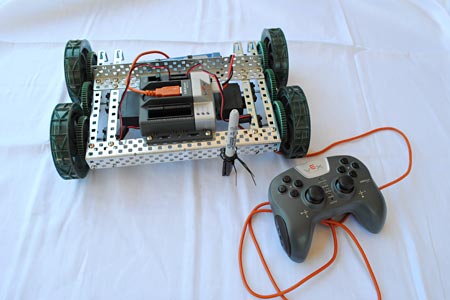 The robot shown above is to an intermediate level, the unique thing about this robot is that it can create art with the markers attached to it and a canvas under it. To build would require a starting robot kit and markers (or paintbrushes) and a canvas. I think this would be great to recreate because it isn't very difficult and it is quite unique to other robots. How it works is you place a canvas under the robot and control it using the remote as it moves, the markers draw over the canvas.
 Reflection: Once again I searched up Robot Ideas, however this time my main focus was finding a robot with something unique about it, which in this one was drawing. When I looked through different robot websites, I found this.
Subscribe to:
Comments (Atom)